Cowork, and the problem of too many Copilots
Cowork is the Copilot that runs on its own and bills by the task. Here is when to reach for it, how to govern it like cloud spend, and where I think this whole thing is heading.
The problem
I get a version of the same question almost every week from a customer. The premise is that they have M365 Copilot, their devs have GitHub Copilot, they now have Copilot Cowork, and a few have access to Microsoft Scout by way of the Frontier program. They look at all of it and ask me the only sensible thing you can ask. When do I use which one?
It’s a fair question, and the fact that it’s hard to answer is the real story. We have shipped a lot of Copilots, and although they differ, they overlap. To the person who has to actually get work done, the line between “ask Copilot,” “use the Researcher agent,” and “hand it to Cowork” is blurry.
This post is about one of those tools, Cowork, which went GA on June 16th, 2026. Cowork as a product gets plenty of attention, but the governance behind it does not, so I want to focus on the two things you have to get right before you let your company loose on it, which are (1) when to reach for it and (2) how to keep it from quietly running up a bill.
What Cowork is
Cowork is an agent that runs in Microsoft’s cloud and does multi-step work on your behalf. You describe an outcome, something like “research these five accounts and draft a one-page brief for each,” and Cowork plans the steps and runs them. It grounds itself in your M365 context, works with plugins to reach into other enterprise tools, and produces finished artifacts you can open and use.
But here is the one fact that changes everything. With Copilot, you pay a per user subscription fee and nothing extra. With Cowork, every task it runs consumes Copilot Credits, which are metered and billed by usage. That single difference is why governing Cowork is a day-one decision and not a thing you do later. A licensed user running M365 Copilot costs you nothing extra, no matter what they’re using Copilot for. The same user running Cowork is spending real money on every task, and the more capable the model and the more steps the job takes, the more it spends.
So before we get to any of the admin work, the first question is the one my customers actually asked. It is also the first thing to teach your users. Which tool fits the task.
When to use Cowork, and when not to
My rule is simple. Scope the tool to the complexity of the task, because complexity is a good proxy for which Copilot you should reach for.
- Plain Copilot chat for quick, single-step asks. Triage my inbox. Draft a reply. Look up this question against our docs. M365 Copilot is fast, and for a licensed user it does not draw credits. This is where most work should stay.
- A first-party agent for a known, repeatable job. Researcher for a deep summary. Analyst for structured data work. These come with the M365 Copilot license, so in-scope use is no incremental charge. If a purpose-built specialist nails the job, use it.
- Cowork for the multi-step, cross-app job you cannot fully script in advance. Something like: “Pull our ten largest open opportunities from the CRM, find recent news on each account, skim our last three meeting notes per account in SharePoint, and draft a one-page pre-call brief for each.” The work spans several apps, takes an unknown number of steps, and needs the agent to act, not just answer. That is where its autonomy earns the credits it spends.
- Scout for work that has to touch the local machine or run on its own for a long time. Scout is the desktop autopilot. It runs code and shell commands, edits local files, and kicks off its own tasks on a schedule. Different tool, different execution model. I wrote about Scout separately here.
The mistake I see coming is people reaching for Cowork because it’s the new shiny thing. Using Cowork to write an email is like renting a crane to hang a picture. It works. But you also just burned credits you are going to want for the job that actually needs a crane. If a quick chat or a first-party agent does the job, that is the answer.
Govern it like cloud spend
Because Cowork is metered, the right way to govern it is to treat it like a cloud budget. Not by accident, the controls Microsoft gives you map almost one to one onto how you would govern Azure consumption.
It starts with a master switch. Cowork is off until an admin turns on usage-based billing, so no billing, no access. You do this in the Microsoft 365 admin center under Copilot, then Cost Management.
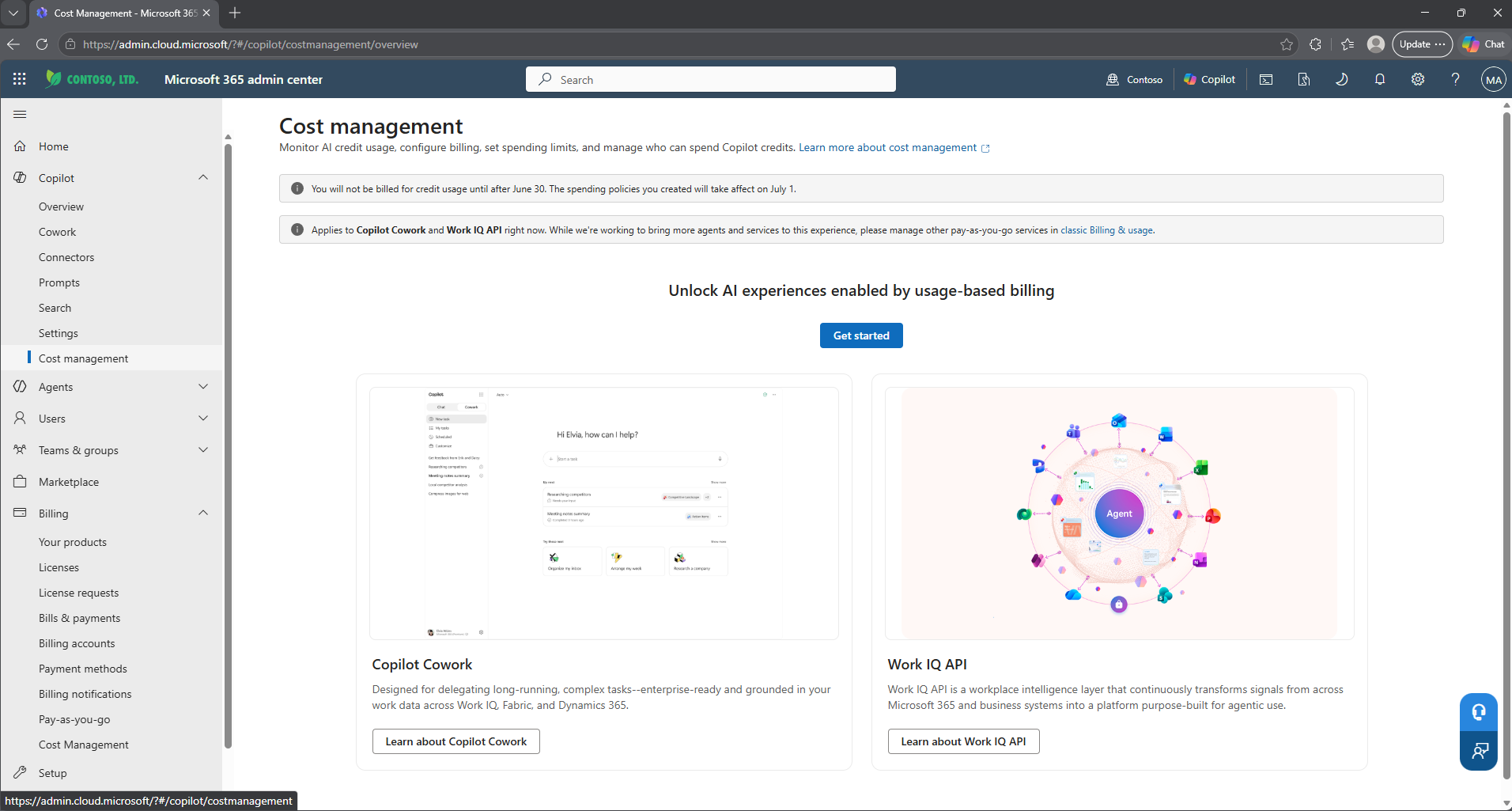
Get Started opens the activation flow for the default spending policy, where you pick a billing method and set your first tenant-wide limits. A Capacity Pack is just a prepaid block of Copilot Credits, the same currency Cowork spends, so a pack you already bought for Copilot Studio can fund Cowork too. If you want pay-as-you-go instead, you need an Azure subscription. In my demo tenant I didn’t have one set up, so prepaid Capacity Packs were my only option.
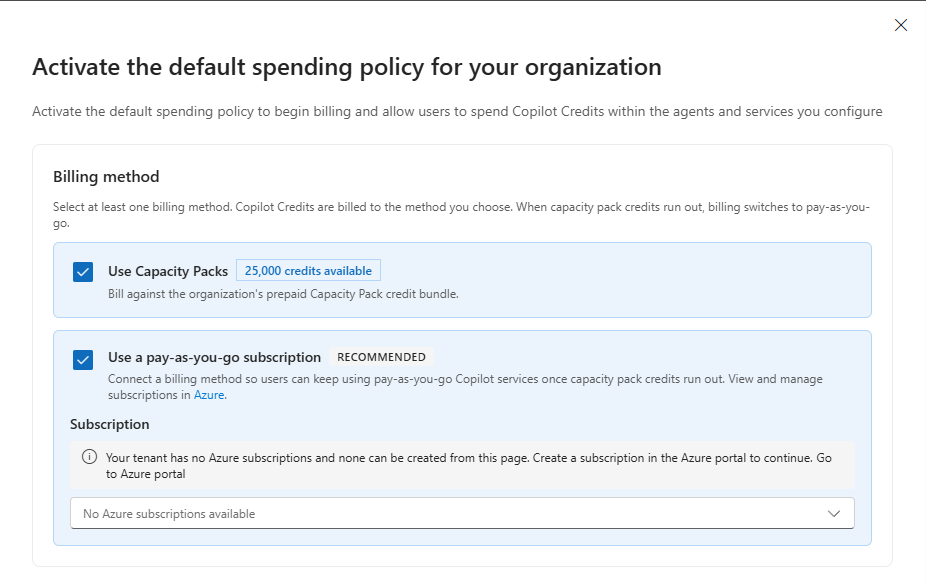
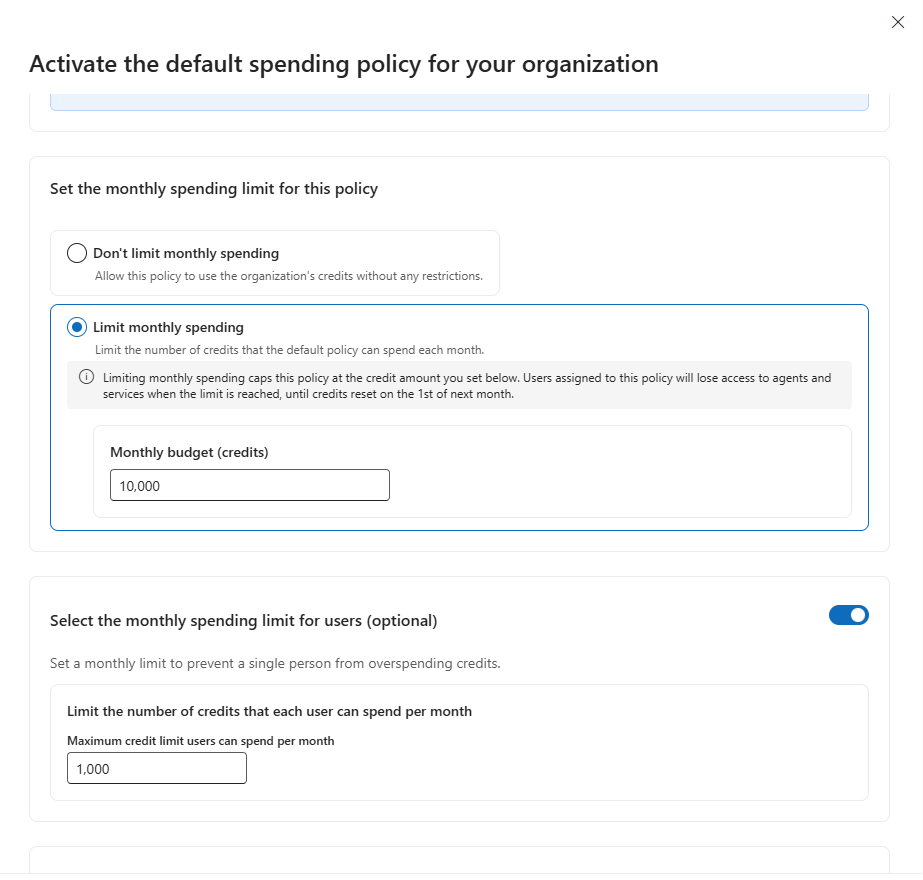
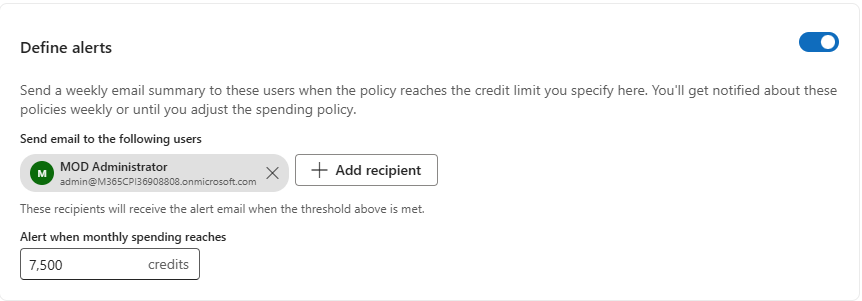
From there, there are three levers:
- A monthly spending cap on the policy. The ceiling, in credits. When the policy hits it, everyone on it loses access until credits reset on the first of the next month.
- A per-user monthly limit. Always set this! And note that this is not a custom budget per person. It’s a single value applied to every user the policy covers, so no one individual can drain the whole pool of credits.
- Alerts before the cap, not at it. A weekly email to named people once spending crosses a threshold you choose, repeating until the month resets. Set it well under the ceiling so you see the trend before anyone hits a wall.
That default policy is your floor. On top of it you scope tighter policies for the teams that consume more, and a few rules govern how they complement one another.
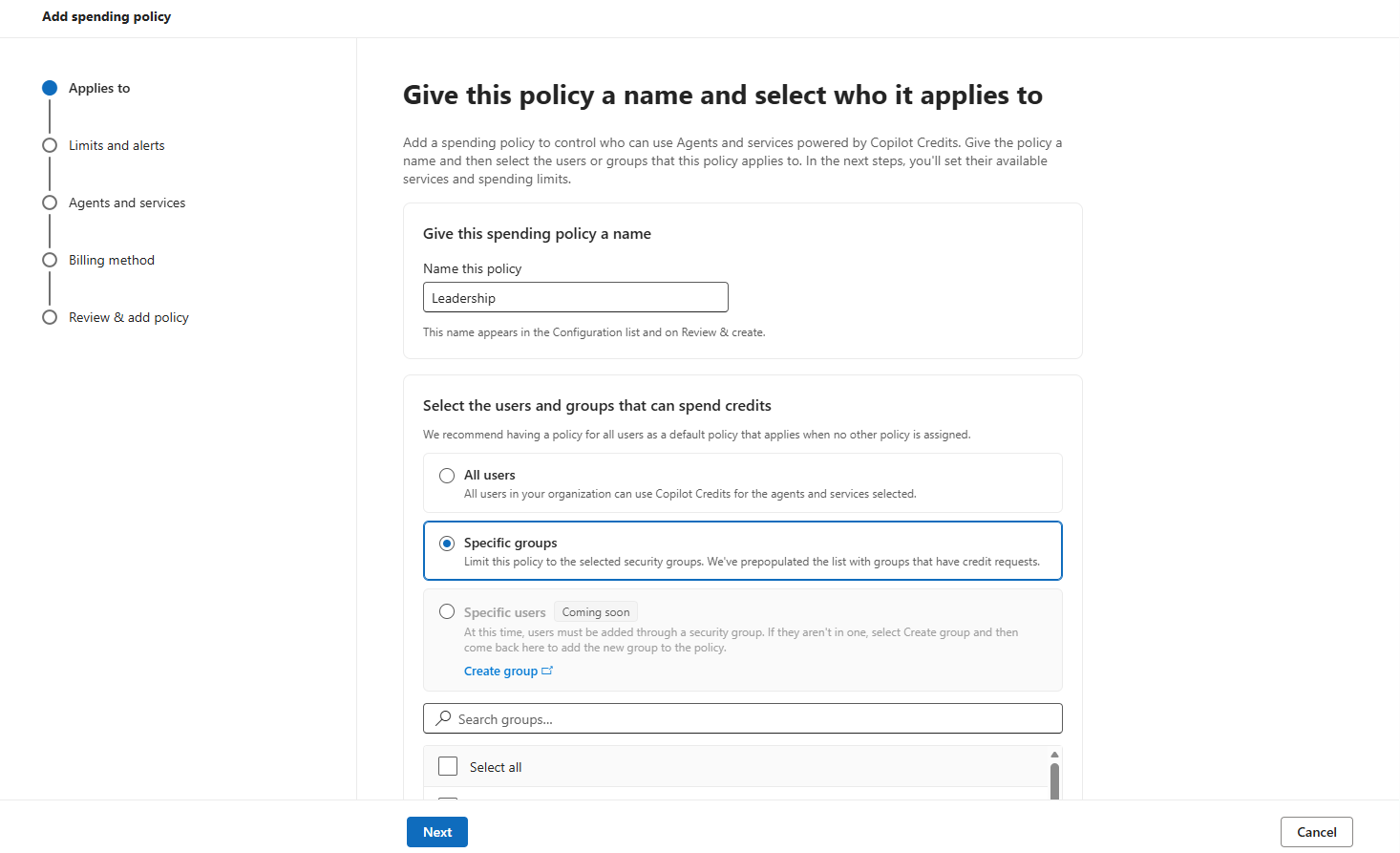
- Policies attach to security groups, not individuals. To single someone out, you put them in a group first, then write a policy for that group.
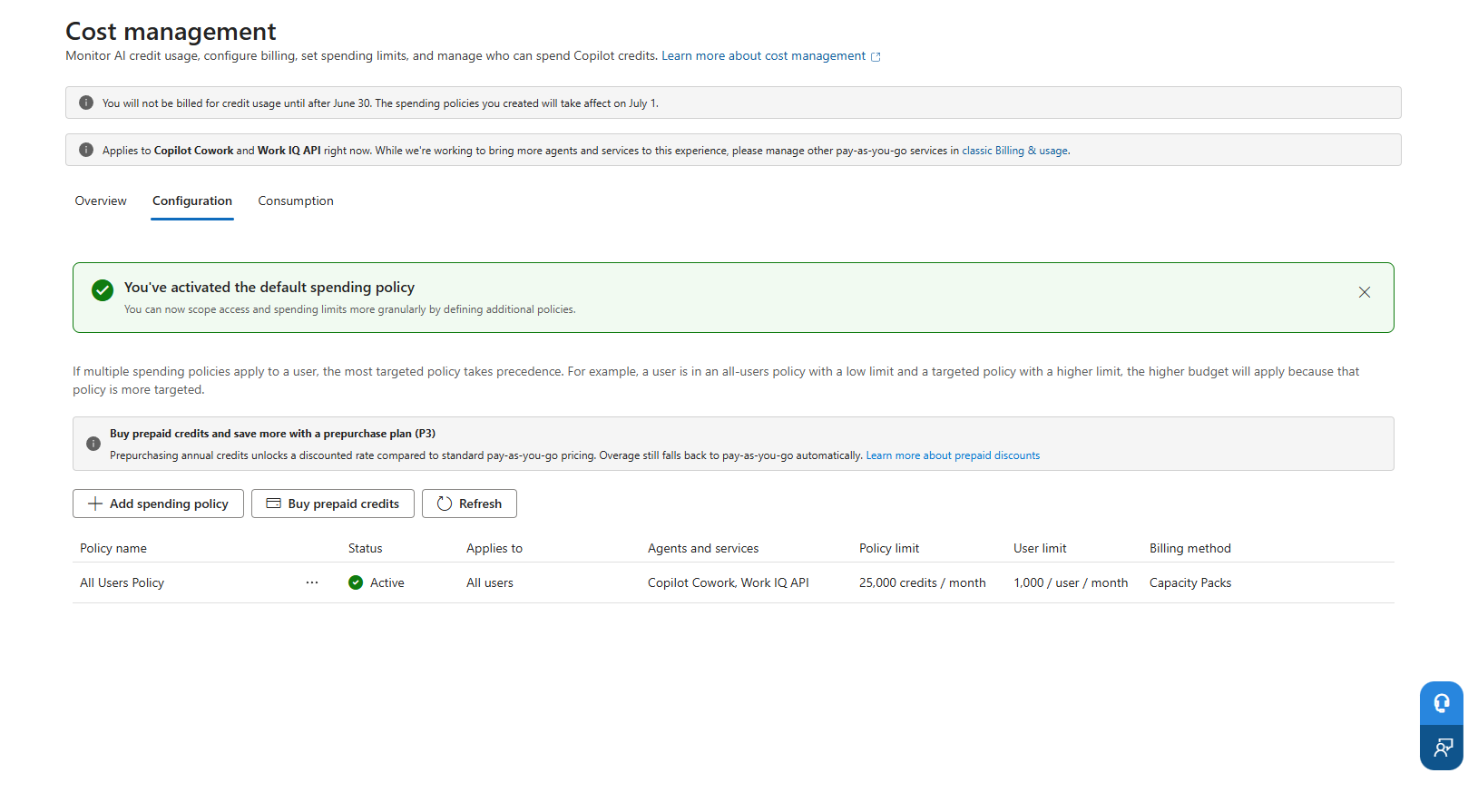
- The most specific policy wins. Someone can sit in several policies at once, say a broad all-users policy at 1,000 credits a month and a narrower policy for their team at 10,000. The team policy applies, not because its limit is higher, but because it targets a narrower group. Specificity decides, not the size of the number. That’s the rule to remember when someone has more or less budget than you expected.
- Each policy carries its own limits, alerts, and covered services. Today that list is Cowork and the Work IQ API, with a toggle to auto-include new services as Microsoft deploys them.
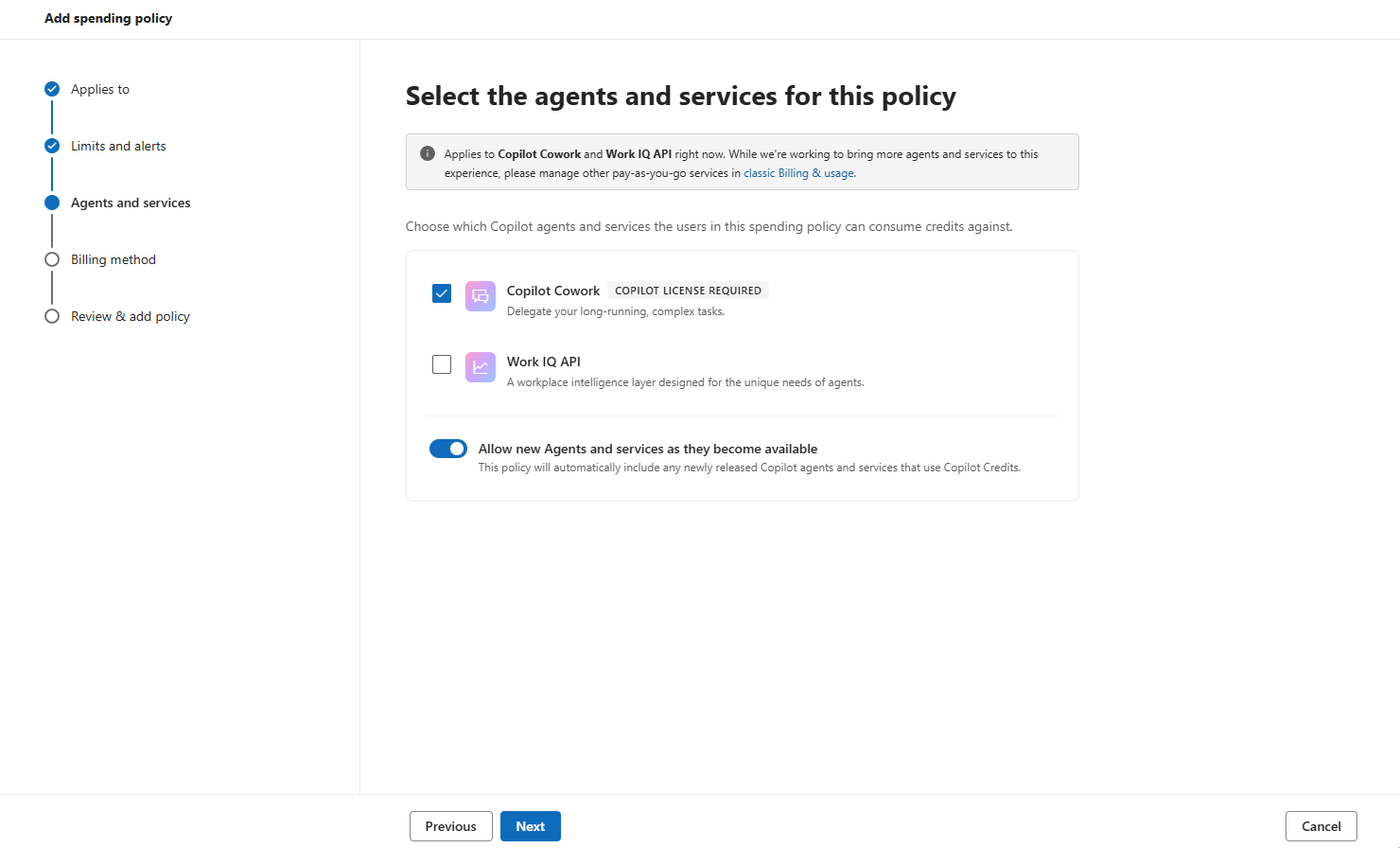
Two more controls worth knowing:
- Least privilege on the admin side. Only Global and Billing admins can set or change the billing method. AI and License admins can build policies, set limits, and read the dashboard, but they can’t touch billing. So run day-to-day Cowork administration on an AI or License admin account, and keep the Global admin login for emergencies only.
- The browser is the highest-risk surface, and it inherits your existing controls. When Cowork drives a task in the user’s local Edge browser, it uses their existing sign-ins, so those tasks inherit the Conditional Access, DLP, and Edge policies you already enforce. The agent has exactly the access the user has, and every browser task lands in the unified audit log. A single Cowork Browsing setting turns the whole capability on or off.
How you pay for it
The currency is Copilot Credits. At pay-as-you-go rates one credit is about one cent, so most single actions are cheap. Microsoft does not publish a per-token or per-task rate for Cowork, so you can’t price a job in advance. Consumption scales with the model you pick, the context it needs, how many steps the job takes, and the tool calls it makes. None of this is scary at the level of a single task. It adds up across an organization, which is the whole reason for the caps above.
There are two ways to fund credits and they are complementary.
- Pay-as-you-go. Billed to an Azure subscription, monthly, for exactly what you used. No commitment.
- Prepaid credits. You buy a block up front at a better rate than pay-as-you-go. The P3 pre-purchase plan runs a one-year term and is sold at a discount (the more you commit, the deeper the discount).
Policies always spend prepaid credits first and fall through to pay-as-you-go only for the overage. So prepaid is your budgeting anchor and pay-as-you-go absorbs the variable tail.
If your organization has a Microsoft Azure Consumption Commitment (MACC), prepaying Copilot Credits through P3 draws down that commitment. So if you’re sitting on a large Azure commitment, that turns Cowork credits from a new line item into spend you were going to make anyway.
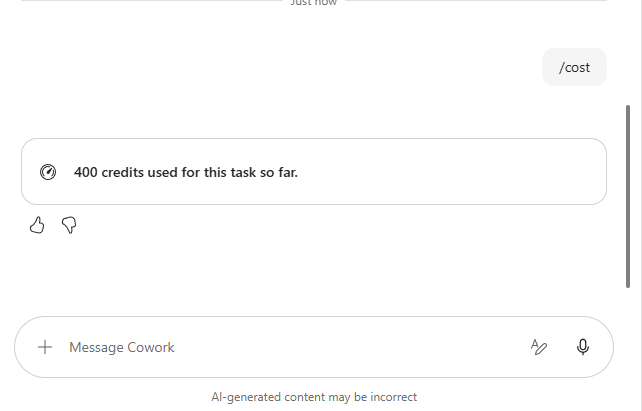
For the end user, there is a small but genuinely useful piece of cost visibility. Type /cost in a Cowork conversation and it tells you how many credits the current task has burned so far.
Teaching people to use it well
Policies stop the worst outcomes. They do not make people use the tool well. The bigger savings, and the bigger risk, comes down to behavior. A few habits to coach, all of which come back to spending credits where they create value.
- Default to Auto model selection. Cowork has a model selector and defaults to Auto, which picks per task and is the right setting for most work. Claude Opus 4.8 and the Sonnet plus Opus Advisor mode, where Sonnet drafts and Opus reviews, are for the high-stakes deliverables that justify the deeper, slower, more expensive reasoning. Sonnet 4.6 is the fast everyday option. (A GPT 5.5 option also shows up, but only for tenants enrolled in Microsoft’s Frontier early-access program.) The point is that reasoning-grade work costs materially more, so steer it to the deliverables that warrant it.
- Scope the ask. A tight, well-defined prompt runs fewer steps and makes fewer tool calls, which means fewer credits. A vague prompt wanders, and wandering is expensive. Teaching people to write clear prompts is a cost control, not just a quality one.
- Reuse, do not re-run. Save the output. Re-running the same broad task because nobody kept the first result is pure waste.
- Right tool for the job. This is the heuristic from the top of the post, applied daily. Push the recurring, bounded work to chat or a first-party agent. Save Cowork for the jobs that need its breadth.
- Mind the multipliers. Browser tasks, image generation, and the heavy reasoning models each add consumption. Use them with intent.
If you want to size all of this before you roll out, Microsoft has a Customer Cowork Estimator to model expected credit volume per persona.
Where I think this is heading
Everything above exists because, today, the choice of tool is yours. You have to know that a quick question goes to chat, a deep summary goes to Researcher, and a twenty-document job goes to Cowork. Get the choice wrong and you either get a worse result or you overspend. That burden, the picking and the paying, is the source of a lot of confusion.
My bet (and this is a bet, I do not have insider knowledge on this) is that this does not last. I think Microsoft eventually collapses this into one interface where you ask it for something, and the orchestrator routes the work to the right engine. This way, a quick triage goes to Copilot, a research task gets handed to the Researcher agent, the bulk document job goes to Cowork, and the long-running, touch-the-machine job goes to Scout. The user never picks a tool. They state an outcome and the system decides how to spend the effort.
To me, this direction feels right because in the current state, we have a growing shelf of overlapping Copilots that the user has to choose between. I don’t think that was a deliberate design decision. It is more likely a byproduct of the path to something simpler.
Until that day comes, the choice is still yours, and so is the bill! Treat Cowork like the metered, capable, slightly dangerous cloud service it is, set the caps before you hand out the access, and teach people to reach for the cheapest tool that does the job.